Tiger Registration
Tiger Registration is designed to help you take the next step toward starting your academic journey at Campbellsville University. During this event, on our Campbellsville campus, you’ll meet with your academic advisor, register for classes, and connect with key campus resources like Financial Aid, Housing, and Academic Support. It’s an opportunity to get your questions answered, finalize important enrollment steps, and feel confident and prepared as you begin your first semester.
Register for Tiger Registration
Choose from multiple Tiger Registration sessions to find the one that fits your schedule. Each session gives you the chance to meet your academic advisor, register for classes, and connect with key campus resources, all designed to help you start your first semester with confidence. Sign up today and secure your spot!
Tiger Registration Overview
To make the most of your Tiger Registration experience, please complete these steps ahead of time:
- Activate Your CU Accounts: Log in to your CU email and student portal in Workday.
- Submit Required Documents: Provide placement test scores or other documents requested in your portal.
- Review Onboarding Requirements: Make sure your enrollment deposit and other forms are submitted.
- Prepare for Advising and Registration: Think about your course interests and questions for your academic advisor.
- Familiarize Yourself with Campus Resources: Learn about Financial Aid, Housing, and other offices you’ll visit during registration.
Tiger Registration is your first step toward a successful start at Campbellsville University. This event, held at our Campbellsville campus, is designed to help you get prepared for your classes, meet your academic advisor, and connect with the campus resources that will support you throughout your college journey. It’s your opportunity to ask questions, register for courses, and feel confident as you begin your first semester. We’re excited to welcome you to the CU community!
Before attending Tiger Registration, please make sure you’ve completed these important steps:
- Log in to your Student Portal on Workday to access your account and resources.
- Submit all onboarding requirements and your Enrollment Deposit.
- Send in any placement test scores requested under “Required Documents” in your portal. Students who do not provide scores may need to test on-site during Tiger Registration.
Tiger Registration and Advising:
During your session, you’ll meet with your academic advisor to review your academic
plan and register for classes. Representatives from Financial Aid, Housing, Academic
Advising, and other campus offices will also be available to answer questions and
provide support.
Placement Test Requirements:
All new students enrolling at CU with less than 24 earned college credit hours must
complete placement testing in English and mathematics. Students can be exempt if they
provide documentation demonstrating proficiency in these subjects before enrollment.
Official scores or proof of proficiency should be submitted to the Office of Admissions
before your Tiger Registration session to avoid on-site testing.
For additional details, consult the University Testing Policy or contact the Office of Admissions at (270) 222-3529 or admissions@campbellsville.edu.
Silver Track:
This track is for students who are ready to register for classes. Meet with your academic
advisor to plan your schedule and take the next step toward an exciting semester!
Check-in begins at 12:30 PM EST at Heilman Welcome Center.
Maroon Track:
This track is for students who need placement testing before registering for classes.
Check-in begins at 10:00 AM EST at the Badgett Academic Support Center, and you should be prepared to complete your placement test upon arrival. Learn more
about our testing policy.
Virtual Placement Testing:
We’re offering virtual placement testing at no additional cost! If you’d like to complete
your placement tests before arriving on campus, please get in touch with your counselor
or email admissions@campbellsville.edu to arrange your session.
Explore your Tiger Registration experience with detailed schedules designed to guide you through the day. Students will follow one of two tracks, Maroon or Silver, based on their registration needs, ensuring a personalized and efficient experience from start to finish.
Each track includes downloadable itineraries tailored to your role:
- New Student - Maroon Itinerary
- New Student - Silver Itinerary
- Transfer Student - Maroon Itinerary
- Transfer Student - Silver Itinerary
- Guest - Maroon Itinerary
- Guest - Silver Itinerary
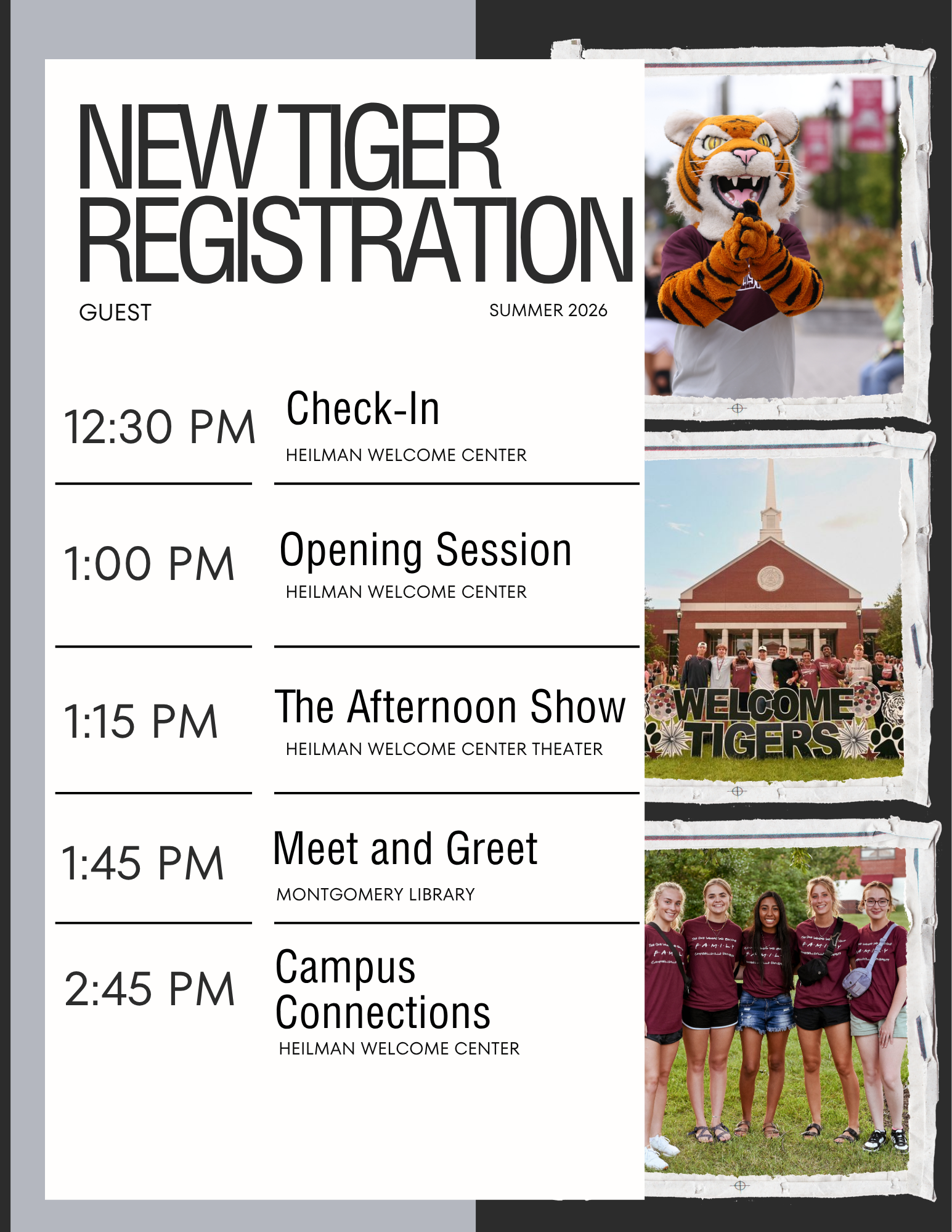
Review your track and download your assigned itinerary to help you prepare, stay organized, and make the most of your time on campus!
Navigate our Campbellsville campus with ease using our campus map. Find academic buildings, residence halls, dining locations, and key campus resources to help you get oriented and make the most of your time on campus. Whether you’re a new student, returning student, or visitor, the map is your guide to everything CU has to offer!
All new students enrolling at CU with fewer than 24 earned college credit hours are required to complete placement testing in English and mathematics. Students may be exempt if they submit official documentation demonstrating proficiency in these subjects prior to enrollment. To avoid on-site testing, please send all qualifying scores or documentation to the Office of Admissions before your Tiger Registration session. Remote testing options are also available for students who need to complete placement exams.
Course placement is determined by ACT scores or placement test results, using the following benchmarks:
English Placement:
- ACT 18 or higher: ENG 111 (Composition I)
- ACT 16–17: ENG 110 (Basic English)
- ACT 15 or lower: ENG 090 (Writing Skills)
Math Placement:
College Algebra Track:
- ACT 22 or higher: MTH 111 (Algebra)
- ACT 21 or lower: MTH 100 (Intermediate Algebra)
College Math Track:
- ACT 19 or higher: MTH 110 (College Math)
- ACT 18 or lower: MTH 099 (Developmental Math)
For additional details, please refer to the University Testing Policy or contact the Office of Admissions at (270) 222-3529 or admissions@campbellsville.edu.
Have Questions?
Reach out to your Admissions Counselor by phone, email, or text, or call our Admissions Office at 270-789-5220 or email admissions@campbellsville.edu.